
Service overload happens a lot. If you haven't seen one, count yourself lucky. The first time I watched it take a system down, I realized how serious it’s to get the basics right and implement mechanisms to avoid it. I remember how it brought down our social services to its knees in the early 2010s. There was no autoscaling, we had fixed capacity, we did manual failovers. One of our write-heavy endpoint slowed due to increased usage. Then, our clients retried as fast as they could. Gradually, a retry storm formed. The fan out hit every single service in social connections. Our thread pools filled, queues were full, everything slowed down and became completely unresponsive. I didn’t yet know the right guardrails; I watched services tip over one by one. Within minutes we lost social connection features end to end. After that complete meltdown, we added circuit breakers to stop it next time. We also updated our runbooks. Back then, we didn’t really account for many of the events that we saw in the incident. These gaps made the cascade inevitable.
A service overload happens when a service receives more incoming requests than it can reasonably respond to the point where demand exceeds engineered capacity, p95/p99 latency spikes, and your reliability budget starts to burn. The point is not infinite capacity, it’s controlled degradation. There are many reasons that service can get overloaded. A few examples are a sudden surge in traffic, a change in the service configuration, attacks by malign actors, and more including benign causes like a “successful” launch, noisy neighbor contention, or repeatedly hitting the database for each item, which begins small but escalates. In the event of a service overload, the service starts to behave differently. It starts returning HTTP error codes, responds with extended latency, denies new connections, returns partial content, and so forth. Treat these as explicit signals and tie each to a runbook action (e.g., admission control for 503 spikes, brownouts for tail-latency drift, targeted throttles on hot endpoints).
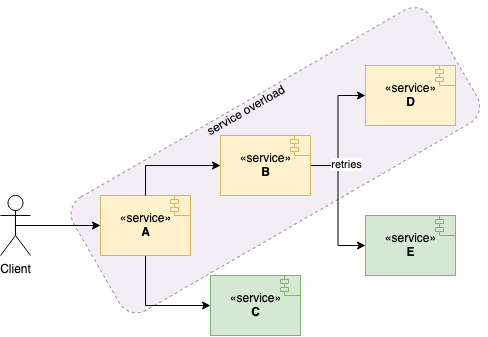 service overload
A service overload in the chain of services might mean overloading the rest of the business, not just one API. If services donʼt build a robust strategy against service overload, then one or two services can take down the whole application, especially when clients retry aggressively.
One service failing to respond might cause clients to retry the service without bounds or jitter. Later, service clients may end up requesting more due to retries and fan-out into multiple downstreams. The overloaded service might become completely unavailable as thread pools fill and queues back up. Consequently, it results in a service blackout for user-visible features.
To mitigate service overload problems, we might want to introduce strategies such as throttling, load shedding, and brownout, kill switches and so forth. We can then tie each mitigation to clear response flow where responders can know exactly when to apply them. In this post, I will go through a few defensive strategies to implement and present a response flow at the very end.
Detect Early
Overload is easiest to deal with when you notice the signs before things tip over. Instead of waiting for errors to spike, keep an eye on a few simple trends: how fast queues are growing, how many requests are in flight, and whether p95/p99 latency is drifting upward. These usually move before a full overload shows up.
Track a small set of signals that tell you when pressure is building. For example, a sudden drop in cache hit rate or a rise in evictions often means the downstream path is about to heat up. At the edges, watch how often the system rejects requests or applies backpressure. These are good early hints that demand is rising.
Place these signals on one clear dashboard so responders don’t have to hunt during an incident. Show latency, concurrency, queue depth, basic error mix, and health of key dependencies in one place. Keep the alerts aligned with your SLOs so pages are meaningful rather than noisy.
After each incident, tighten or relax thresholds based on what actually helped. If something paged too late, adjust the trigger; if something was too chatty, raise it slightly. Over time, these small refinements make early detection smooth and predictable. Now, let's see how we can use throttling to control usage.
Throttling
The throttling is a mechanism to control the usage of a service at the edges (gateway/client) so excess load doesn’t fan out. Throttling introduces a cap for a client ideally per caller/tenant to keep things fair. There are two ways to define a cap. The first one is API level throttling which sets a cap for a certain API path to protect hot endpoints specifically. The second one is service level throttling which sets a service-wide cap to use sparingly and pair with simple in-flight concurrency limits.
For both types of caps, the service simply rejects new requests from the same client when clients reach the cap using a token-bucket or leaky-bucket limiter to smooth bursts. Typically, it means the service will return HTTP 429 – Too Many Requests with a Retry-After hint. Clients should use bounded, jittered backoff. Export basic metrics like “limited vs served” and who was throttled so you can tune the caps. A sample code for Node.js is as follows where we limit user API access. You can technically swap this with a Redis-backed limiter in production.
// Minimal throttling (per-caller, per-path).
const buckets = new Map();          // key -> { tokens:number, t:number }
const CAP = 20;                     // max tokens
const REFILL_PER_SEC = 5;           // refill rate (tokens/sec)

function callerKey(req) {
  const callerHeader = req.get('X-Caller');
  const caller = callerHeader || req.ip || 'anon';
  const path = req.path || req.url || '/';
  return `${caller}:${path}`;
}

export function throttle(req, res) {
  const key = callerKey(req);
  const nowSec = Date.now() / 1000;

  // Bucket init
  let bucket = buckets.get(key);
  if (!bucket) {
    bucket = { tokens: CAP, t: nowSec };
    buckets.set(key, bucket);
  }

  // Refill
  const elapsedSec = nowSec - bucket.t;
  const refillTokens = elapsedSec * REFILL_PER_SEC;
  const tokensAfterRefill = Math.min(CAP, bucket.tokens + refillTokens);
  bucket.t = nowSec;

  // Admission check
  const neededTokens = 1;
  const tokenDeficit = neededTokens - tokensAfterRefill;

  if (tokenDeficit > 0) {
    const secondsToNextToken = tokenDeficit / REFILL_PER_SEC;
    const retryAfterSec = Math.max(1, Math.ceil(secondsToNextToken));

    // Response headers
    res.set('Retry-After', retryAfterSec);

    // Optional debugging headers:
    // const remaining = Math.max(0, Math.floor(tokensAfterRefill));
    // res.set('X-RateLimit-Limit', String(CAP));
    // res.set('X-RateLimit-Remaining', String(remaining));

    res.status(429).send('Too Many Requests');
    return; // caller should stop handler here
  }

  // Admit
  const tokensAfterAdmit = tokensAfterRefill - neededTokens;
  bucket.tokens = tokensAfterAdmit;
}
Load Shedding
Load shedding is a mechanism to start rejecting excess requests by clients to focus on requests that the service can reasonably serve, prioritizing high-value traffic and dropping the rest. In the world of elastic computing, services can scale horizontally when they are configured, but you still need a hard stop when concurrency or queue time crosses safe bounds. Nevertheless, no service can scale indefinitely. Shedding excess requests can keep the service more available by protecting tail latency and preventing cascading timeouts. When a service approaches its limit, itʼs better to serve a portion of requests with low latency.
Typically, the load shedding mechanism will kick in if a threshold is crossed for a given metric e.g. latency, queue depth, or in-flight concurrency. Then, a server will send an HTTP 503, Service Unavailable response with a Retry-After hint. Prefer per-caller quotas so one tenant can’t crowd out everyone else. The service can instruct clients to retry the service after some time by the retry-after header. Clients should use bounded, jittered backoff and idempotency keys for writes. Expose ‘shed vs served’ so you can tune thresholds. Implement simple classes (critical, degraded, background) so your shedder drops background work first, preserves critical paths, and exposes “shed vs served” metrics to tune thresholds.
// Minimal load shedding (global in-flight cap + class reserve).

let inFlight = 0;

// Tunables
const GLOBAL_MAX = 200;        // hard in-flight cap
const CRITICAL_RESERVE = 40;   // capacity reserved for critical work
const RETRY_AFTER_SEC = 1;     // hint for callers

function requestClass(req) {
  return req.get('X-Request-Class');
}

export function loadShed(req, res) {
  const isCritical = requestClass(req) === 'CRITICAL';

  // Compute current availability
  const availableSlots = Math.max(0, GLOBAL_MAX - inFlight);
  const reserveThreshold = GLOBAL_MAX - CRITICAL_RESERVE;

  // Check reserve for non-critical
  const reserveWouldBeViolated = !isCritical
      && inFlight >= reserveThreshold;

  // Check hard cap
  const overCapacity = inFlight >= GLOBAL_MAX;

  if (reserveWouldBeViolated || overCapacity) {
    const retryAfter = RETRY_AFTER_SEC;

    // Response headers
    res.set('Retry-After', retryAfter);
    // Optional telemetry headers:
    // res.set('X-Shed', '1');
    // res.set('X-Request-Class', cls);
    // res.set('X-InFlight', String(inFlight));
    // res.set('X-Avail', String(availableSlots));

    res.status(503).send('Service Unavailable');
    return; // caller should stop handler here
  }

  // Admit: increment in-flight and decrement on response finish
  inFlight += 1;
  res.on('finish', () => { inFlight -= 1; });
}
Brown Out
Browning out is a mechanism to keep serving clients with bare minimum computation when the service hits its capacity. It degrades non-critical features so core paths stay fast. Imagine a service that returns a product catalog on the front page. The service depends on two more services. One of them returns previously bought products. The other one serves recommended products. If the service hits its capacity, then we will try to compute less. For instance, we will just call the service with previously bought products and skip recommendations. Expose this mode via feature flags, send a lightweight payload, and prefer cache-only/stale data over fresh, expensive calls. The service will send a response with extra headers indicating it has browned out and retry after (e.g., X-Brownout: 1, Retry-After: 5, optionally an HTTP Warning header).
In the above diagram, service A depends on service B and service C. Perhaps, service A can keep serving by just leveraging service C as it’s still able to keep up with the demand ; classify work as critical vs. nice-to-have and drop the latter first. Trigger brownout on leading signals and exit gradually with hysteresis to avoid flapping. Log/metric “browned_out vs served” counts so you can tune thresholds, and surface a subtle UI hint so users know content is reduced, not broken. A sample code would be as follows for browning out.
// Minimal brownout gate (hysteresis + headers)

let inFlight = 0;

// Tunables (set for your service)
const HIGH_WATER = 180;  // enter brownout at/above this in-flight
const LOW_WATER  = 120;  // exit brownout at/below this in-flight
const RETRY_AFTER_SEC = 5;

let brownoutActive = false;

function shouldBrownOut() {
  const enter = !brownoutActive && inFlight >= HIGH_WATER;
  const exit  = brownoutActive && inFlight <= LOW_WATER;
  if (enter) brownoutActive = true;
  else if (exit) brownoutActive = false;
  return brownoutActive;
}

export function brownout(req, res) {
  // Track in-flight for simple signal like this
  inFlight += 1;
  res.on('finish', () => { inFlight -= 1; });

  const active = shouldBrownOut();
  req.brownout = !!active;

  if (active) {
    res.set('X-Brownout', '1');
    res.set('Retry-After', RETRY_AFTER_SEC);
    // res.set('Warning', '199 - "degraded response"');
  }
  // proceed with handler code
}
Kill Switches
Kill switches are fast, controlled ways to disable non-critical features under stress so core paths keep working. They’re usually implemented as feature flags, routed configs, or env toggles, and can be flipped by oncall without a deploy. Expose coarse and fine-grained switches (product-wide vs per-endpoint/feature) so you can drop optional work first. Make them idempotent and safe. Disabling a feature must never corrupt state or block critical writes. Pair kill switches with brownout and shedding: switch off heavy fan-outs, then degrade, then shed.
Operationally, treat kill switches like safety equipment. Put the toggles on a single “degrade mode” dashboard with clear names, owners, and expected effects. Gate flips behind RBAC and record who/when/why for audit. Return lightweight responses and set headers (e.g., X-Feature-Disabled: recs) so clients know content is reduced, not broken.
// Minimal kill switch (no env).

const DISABLED = new Set(); //set of services to disable

export function flipKillSwitch(feature, disabled) {
  if (disabled) DISABLED.add(feature);
  else DISABLED.delete(feature);
}

export function killSwitch(req, res, feature, opts = {}) {
  const isDisabled = DISABLED.has(feature);
  const soft = !!opts.soft;

  if (!isDisabled) return true;

  // Always surface that the feature is disabled
  res.set('X-Feature-Disabled', String(feature));

  if (soft) {
    req.killed = req.killed || {};
    req.killed[feature] = true; // handler can degrade locally
    return true;
  }

  // Hard kill: stop here with a lightweight response
  res.status(204).end(); // No Content
  return false;
}
A Practical Overload Response Flow
Here’s an overload flow you can rely on when a service starts to strain. It’s the sequence most systems follow under pressure: slow things down at the edges, protect the core, shed non-essential work, and then unwind changes once the graphs settle. The steps below outline that path in a clear, predictable way.
Declare Overload Early
When a service begins sliding into overload, the first meaningful action is simply to name it. Rising p99 latency, deepening queues, and growing in-flight concurrency are sufficient signals. Saying “We’re overloaded” creates an immediate shared understanding and aligns the team’s attention. Establishing clear roles such as driver, implementer, communicator prevents conflicting actions and reduces cognitive load during the response.
Stabilize the Edges
The quickest way to slow an overload is to limit what enters the system. Throttling at the gateway or applying per-caller rate limits prevents unbounded fan-out and stops retry storms before they form. A fast 429 with a Retry-After header is safer than letting requests accumulate until the queue fills up. Client-side bounded, jittered retries, when available, further reduce pressure and prevent amplification of the overload state.
Protect Core Functionality
Once inbound traffic is controlled, our attention shifts to preserving the parts of the system that matter most. Critical paths must remain responsive, while background jobs and “nice-to-have” features are deliberately slowed or dropped. Class-aware shedding helps prevent queue saturation, reduces CPU contention, and avoids the runaway effects that typically lead to cascading failures.
Enter a Lighter Operating Mode
If load continues climbing, brownout techniques allow the service to keep responding while doing less work per request. Serving cached or stale responses, skipping optional downstream fan-outs, and trimming payloads all reduce compute and I/O demands. Signaling degraded mode via headers improves later debugging and provides clarity when reviewing logs or traces.
Disable Expensive Features
When brownout is insufficient, heavy features must be turned off entirely. Expensive operations such as search, recommendation engines, enrichment pipelines, broad fan-outs can be disabled instantly using kill switches. This prevents avoidable CPU spikes and saves downstream systems from overload. Recording what was disabled and why ensures a clean recovery path later.
Monitor and Protect Backends
Backends are often the first subsystems to hit hard limits. Rising cache miss rates, saturated database connection pools, and increasing queue lag all signal imminent deterioration. Reducing write concurrency, pausing background consumers, or prioritizing cache-preferred reads can prevent a single hotspot from collapsing multiple upstream services through cascading timeouts or contention.
Communicate Clearly and Frequently
Short, factual updates keep everyone synchronized. State what changed, what improved, and what remains degraded. Avoid theorizing or speculating; only describe observable behavior. This level of clarity reduces friction, simplifies decision-making, and keeps the team focused on the system’s actual state rather than interpretations of it.
Recover Gradually
After metrics stabilize, latency within SLO, queues draining, and consistent health for 10–15 minutes, begin unwinding mitigation steps one by one. Re-enable kill switches, exit brownout, reduce shedding, and relax throttling last. Making changes gradually and observing the graphs after each adjustment prevents a second overload during recovery.
Reflect and Improve While Details Are Fresh
When the incident resolves, take time to assess the response. Identify alerts that were late, dashboards that were confusing, thresholds that were poorly tuned, or actions that took too long to trigger. Choose one concrete improvement to implement. Incremental refinements build operational resilience and make future overloads more routine than disruptive.
Conclusion
In this post, I’ve gone through some of the strategies to cope with service overload. These are some guards against legitimate traffic. They mitigate the overload problem to a certain extent. After hitting max capacity, the service will be overwhelmed and blackout. The point is not infinite capacity, it is controlled degradation. These strategies though would delay the blackout as long as they can.
With per-caller throttling, class-aware shedding, brownout, and kill switches, you keep core paths alive while trimming the rest. Without any of these strategies employed, services will be very vulnerable to sudden spikes. Elastic computing might help but may not be sufficient. Capacity helps, discipline wins. Wire signals to actions, practice the runbook, and make the next overload uneventful for users.
Good Reads
Article: What is API Throttling?