
In early days of computing, there was no need for distributed transactions, everything lived in one place. As number of applications increased, synchronization of the data become an important issue, and consistency stopped being “free.” Companies paid a lot to maintain synchronized systems in terms of data flow, because broken data flow is just silent data corruption. As a result, 2 phase commit protocol referred as XA(eXtended Architecture) arose, as a practical answer to “how do we commit across multiple systems?” This protocol provides ACID like properties for global transaction processing, but at a cost (latency, complexity, failure modes). Throughout this article, I will try to explain details of XA transactions and use of XA Transactions in Spring framework, from the protocol mechanics to real-world usage.
2 phase commit protocol is an atomic commitment protocol for distributed systems, meaning everyone either commits together or nobody commits at all. This protocol as its name implies consists of two phases, a handshake before the actual decision. The first one is commit-request phase in which transaction manager coordinates all of the transaction resources to commit or abort, basically asking “are you ready?”. In the commit-phase, transaction manager decides to finalize operation by committing or aborting according to the votes of the each transaction resource, and at that point the system must be consistent even if someone drops mid-flight. We will next move on to implementation details of 2PC protocol, because the real story is in the calls and states.
XA transactions need a global transaction id and local transaction id(xid) for each XA resource, because every participant must be uniquely tracked across the whole commit story. Each XA Resource is enlisted to XA Manager by start(xid) method, which is effectively the “you are now part of this” call. This method tells that XA Resource is being involved in the transaction(be ready for operations), so the resource can switch to transactional behavior and begin recording what matters. After that, first phase of the 2PC protocol is realized by calling prepare(xid) method, the point where guessing ends and voting begins. This method requests OK or ABORT vote from XA Resource, meaning “can you commit what you have so far, if I ask you to?”. After receiving vote from each of XA Resource, XA Manager decides to execute a commit(xid) operation if all XA Resources send OK or decides to execute a rollback(xid) if an XA Resource sends ABORT, because one “no” poisons the entire global transaction. Finally, end(xid) method is called for each of XA Resource telling that the transaction is completed, and the resource can release locks and clean its transactional context. Look at the figure to understand better, because the call order matters more than the names. As we build a background in XA transaction implementation, we will next go deeper and see types of failures and possible solutions, where XA stops looking clean and starts looking real.
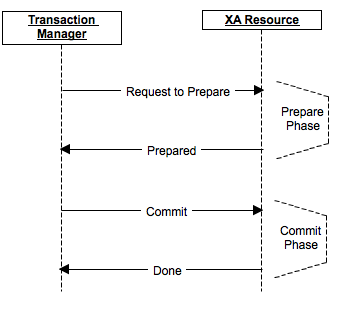 Two-phase commit diagram
Failures can occur at any time due to network loss, and distributed systems are built on the assumption that something will eventually fail. Network partitions, crashes of transaction manager or XA resources, timeouts or partial message delivery can happen in any phase of the protocol, often at the worst possible moment. Because of this, XA protocol defines strict recovery rules and heuristics, not to prevent failures, but to survive them. Transaction manager must be able to determine final outcome by consulting its logs and communicating with XA resources during recovery, essentially reconstructing the past. XA resources, on the other hand, must remember prepared transactions and respond correctly after restart, even if they would rather forget them. In some extreme cases, heuristic decisions might be taken, where a resource commits or rolls back on its own to unblock itself, which can lead to temporary inconsistency. These scenarios highlight that XA transactions are not just a programming concern, they are an operational and organizational commitment.
For recovery, transaction manager calls recover method of each XA resource, basically asking “what do you remember?”. XA Resources trace the logs and tries to rebuild its latest condition, replaying intent rather than guessing state. Transaction Manager calls necessary rollback operations and mission is accomplished, at least in the ideal case. This process can seem to be happy path but there are a lot of exceptional situations where logs are problematic like being corrupted, and recovery suddenly becomes archaeology. In these kinds of situations, transaction manager follows some heuristics to solve the problem, making a decision that is correct enough to move forward. Moreover, the recovery process depends on the write-ahead logs where you write operation logs before applying, because durability always comes before execution. For performance issues these logs are written in their own format(not using any serialization) and system should better batch them if possible, otherwise the transaction manager becomes the bottleneck. We next go to fun part which is XA transaction support by Spring framework, where theory finally meets code.
Spring framework supports XA transactions via JTA(Java Transaction API), but it does so in a very opinionated way. You usually don’t deal with XA APIs directly, because Spring intentionally hides them behind abstractions. Instead, you configure a JTA-compliant transaction manager and XA-aware resources, and let Spring orchestrate the lifecycle. Once configured, @Transactional annotation works almost the same as local transactions, which is both powerful and slightly dangerous. Under the hood, Spring delegates transaction boundaries to the JTA manager, and your code remains blissfully unaware of the distributed complexity. This abstraction lowers the entry barrier significantly, but it also makes it easy to misuse XA without realizing the cost. Understanding what happens beneath Spring’s convenience layer is crucial, otherwise you are debugging distributed systems with a local-transaction mindset.
Bitronix is easily configured while providing good support for transaction management. It is not commonly used in stand alone applications but I will try to give configuration for stand-alone application as follows.
// build.gradle (or pom.xml equivalent)
// implementation "org.springframework:spring-jdbc:<version>"
// implementation "org.springframework:spring-tx:<version>"
// implementation "org.springframework:spring-context:<version>"
// implementation "org.springframework:spring-jms:<version>" // if using JMS
// implementation "org.codehaus.btm:btm:<version>"
// implementation "org.codehaus.btm:btm-spring:<version>"
// implementation "com.zaxxer:HikariCP:<version>" // optional
// runtimeOnly "<your JDBC driver>"
import bitronix.tm.TransactionManagerServices;
import bitronix.tm.resource.jdbc.PoolingDataSource;
import org.springframework.context.annotation.Bean;
import org.springframework.context.annotation.Configuration;
import org.springframework.transaction.PlatformTransactionManager;
import org.springframework.transaction.annotation.EnableTransactionManagement;
import org.springframework.transaction.jta.JtaTransactionManager;
import javax.transaction.TransactionManager;
import javax.transaction.UserTransaction;
public class BitronixXaConfig {
/**
* Bitronix will manage XA enlist/prepare/commit/rollback across all registered XA resources.
* We expose it to Spring via JtaTransactionManager.
*/
(destroyMethod = "close")
public PoolingDataSource ordersXaDataSource() {
PoolingDataSource ds = new PoolingDataSource();
// Unique name is mandatory in Bitronix
ds.setUniqueName("ordersDS");
// XADataSource implementation class for your DB
// Examples:
// Postgres: org.postgresql.xa.PGXADataSource
// MySQL: com.mysql.cj.jdbc.MysqlXADataSource
// Oracle: oracle.jdbc.xa.client.OracleXADataSource
ds.setClassName("org.postgresql.xa.PGXADataSource");
// XA properties are passed as strings
ds.getDriverProperties().put("serverName", "localhost");
ds.getDriverProperties().put("portNumber", "5432");
ds.getDriverProperties().put("databaseName", "orders");
ds.getDriverProperties().put("user", "postgres");
ds.getDriverProperties().put("password", "postgres");
// Pool settings
ds.setMinPoolSize(1);
ds.setMaxPoolSize(10);
ds.setAllowLocalTransactions(true); // handy for dev, but avoid mixing in prod
return ds;
}
(destroyMethod = "close")
public PoolingDataSource billingXaDataSource() {
PoolingDataSource ds = new PoolingDataSource();
ds.setUniqueName("billingDS");
ds.setClassName("org.postgresql.xa.PGXADataSource");
ds.getDriverProperties().put("serverName", "localhost");
ds.getDriverProperties().put("portNumber", "5432");
ds.getDriverProperties().put("databaseName", "billing");
ds.getDriverProperties().put("user", "postgres");
ds.getDriverProperties().put("password", "postgres");
ds.setMinPoolSize(1);
ds.setMaxPoolSize(10);
ds.setAllowLocalTransactions(true);
return ds;
}
public PlatformTransactionManager transactionManager() {
TransactionManager tm = TransactionManagerServices.getTransactionManager();
UserTransaction ut = TransactionManagerServices.getTransactionManager();
return new JtaTransactionManager(ut, tm);
}
}
And here how you use it.
import org.springframework.jdbc.core.JdbcTemplate;
import org.springframework.stereotype.Service;
import org.springframework.transaction.annotation.Transactional;
import javax.sql.DataSource;
public class PaymentService {
private final JdbcTemplate ordersJdbc;
private final JdbcTemplate billingJdbc;
public PaymentService(
DataSource ordersXaDataSource,
DataSource billingXaDataSource
) {
this.ordersJdbc = new JdbcTemplate(ordersXaDataSource);
this.billingJdbc = new JdbcTemplate(billingXaDataSource);
}
/**
* Single @Transactional boundary, two different XA resources.
* If either insert fails, Bitronix drives 2PC and rolls both back.
*/
public void createOrderAndInvoice(long orderId, long invoiceId, int amountCents) {
ordersJdbc.update(
"insert into orders(id, amount_cents) values (?, ?)",
orderId, amountCents
);
billingJdbc.update(
"insert into invoices(id, order_id, amount_cents) values (?, ?, ?)",
invoiceId, orderId, amountCents
);
// throw new RuntimeException("boom"); // uncomment to see global rollback
}
}
We can now have multiple data sources which can be configured as follows, each representing a separate transactional participant. Each data source should have a uniqueName property which is unique, because Bitronix uses this identifier to track and recover XA resources correctly. Below configuration is for PostgreSQL, used here purely as an example, other databases can have different XA configurations. For further details, you can check the Bitronix documentation, especially for database-specific XA properties and limitations.
To sum up, we have tried to explain what is XA Transactions, underlying protocols and Bitronix Transaction Management integration with Spring in a stand alone application, from theory to configuration to runtime behavior. To extend, XA Transactions provides modifying different data sources at the same time, under a single atomic boundary. Furthermore, XA Transactions are supported by web containers or hibernate like frameworks, typically via JTA abstractions that hide most of the plumbing. Nevertheless, we may need to integrate transaction management to a stand alone application in which we must configure transaction manager, and take responsibility for recovery, timeouts, and operational tuning. In consequence, XA transaction provides consistent operations on multiple data sources and companies make use of them, especially where strong consistency is non-negotiable and the complexity budget is justified.